
Customer and supplier accounts
Customer, supplier and employee accounts; risk limit, balance, statement.
Sector-independent
Start with customer accounts, stock, sales, invoicing and cash; add CRM, e-Documents, accounting, production and service modules as you need them. All on the same database, with one login.
Core ERP
From customer accounts to reports, every part of day-to-day accounting is connected. One sale updates stock, the customer account, cash and reports at the same time.
Customer, supplier and employee accounts; risk limit, balance, statement.
Variants, barcodes, unit conversion, price lists.
Receipts, issues, transfers, counts, batch and serial tracking.
Orders, stock reservation, partial dispatch, delivery dates.
Sales and purchase invoices, returns, withholding and exemption codes.
Collections, payments, transfers, card commission, cheque and note portfolio, due-date calendar.
Sales and purchase analysis, account ageing, stock valuation, sales profitability; Excel and PDF.
Permissions by branch and warehouse; every user sees only their own work.
Customer accounts, items and opening balances; trial import and undo.
Modules
Every module uses the same data as the core; no separate program, no separate import. Choose a module to see its screens.
Collections and documents
The collection screen is the heart of the ERP: the amount posts to cash, the document goes out as e-Archive or e-Invoice and the item leaves stock at the same time.
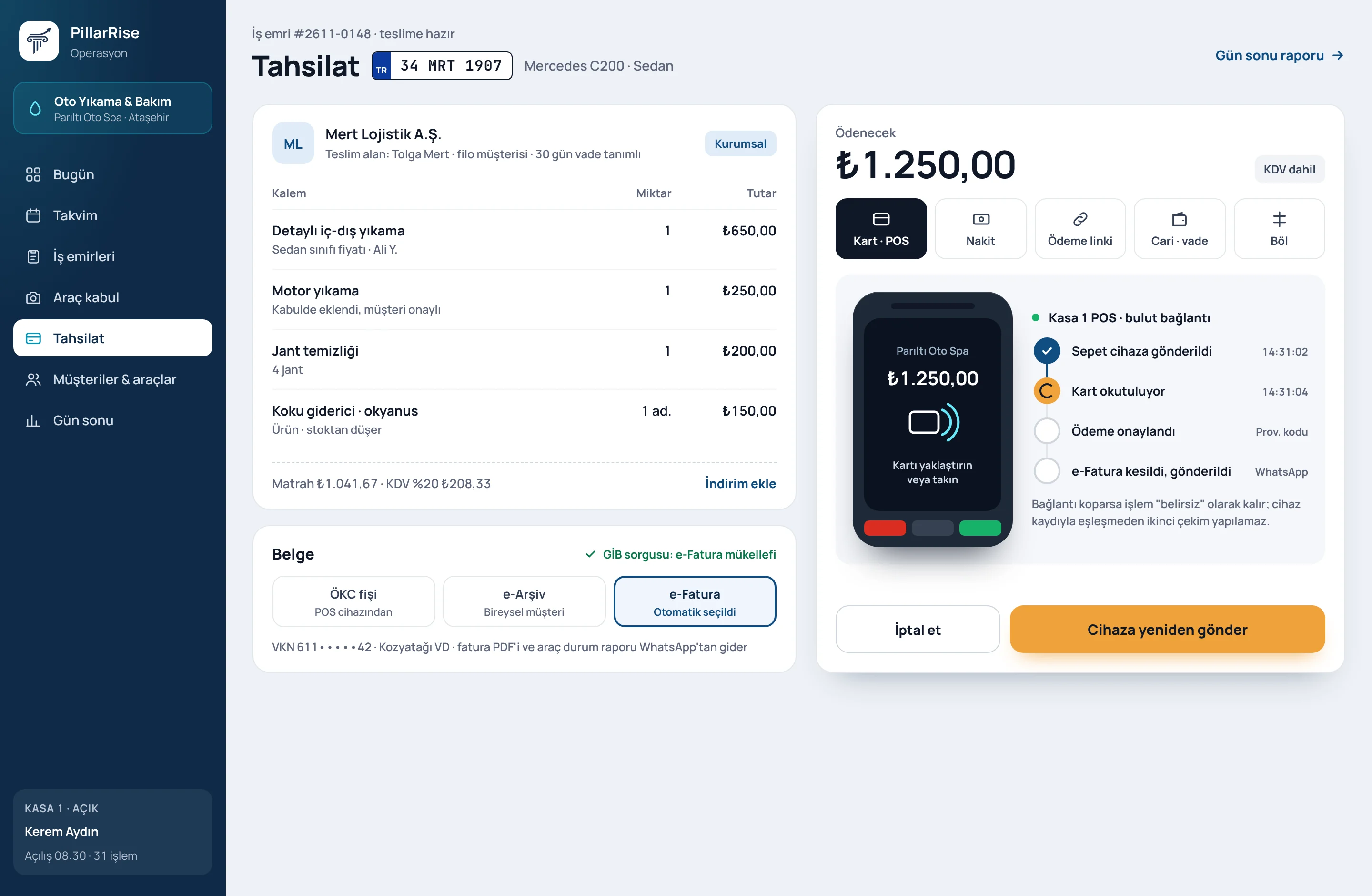
Shown with sample data. Business and personal names are not real. Application screens are in Turkish.
Integration tools
One document chain
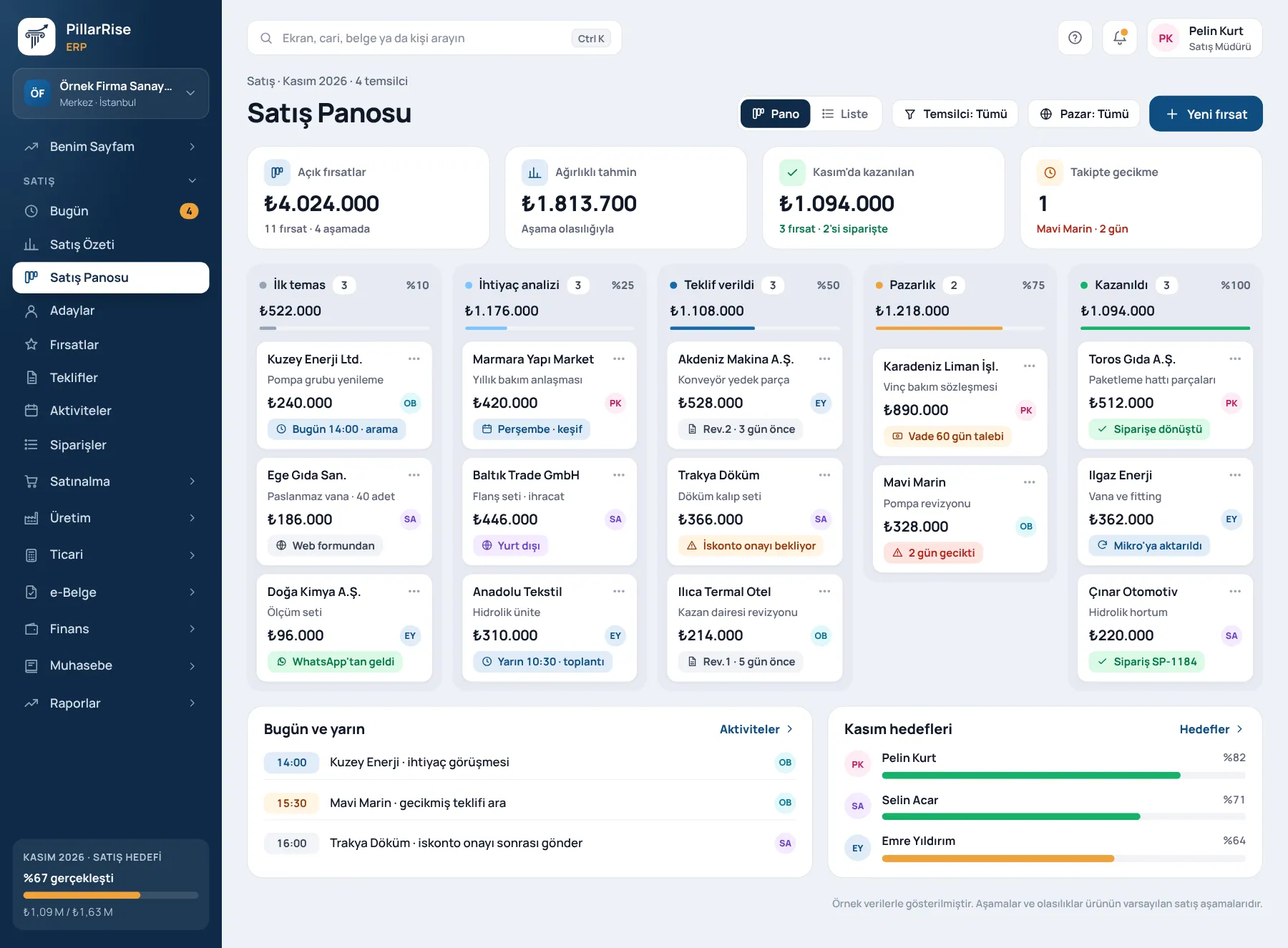
Every document is born from the previous one; the same information is never entered twice, and you can always see which link of the chain it is on.
Prepared in the CRM and accepted by the customer from a link.
Accepted lines become an order and stock is reserved.
A work order opens if needed; a delivery note is issued on dispatch.
Invoice from the delivery note, e-Invoice or e-Archive from the invoice.
The bank transaction arrives and settles the invoice.
The journal entry is created from the document automatically.
Common to every module
Permission matrix and roles by module; users see only their own branch; customer balance visibility per user.
Issued documents are never deleted; cancellations remain on record. Who changed what and when is recorded.
Screen and report search with Ctrl+K, training videos inside the screen, every list exportable to Excel.
Sales and purchase analysis, account ageing, stock valuation; a free-form report designer.
Multiple branches and warehouses, foreign-currency documents and exchange differences, an English document template for customers abroad.
Cloud use, or on-premise installation with a signed licence and signed update packages.
Why it matters
| A growing business's familiar pain | In PillarRise ERP |
|---|---|
| The same information is typed into three programs. | A record is entered once; quotation, order, invoice and journal are on the same chain. |
| Stock, accounting and sales figures never agree. | One database; cost and balances are calculated from transactions. |
| Excel files stay on people's computers. | Every list and report is open according to permissions and exports to Excel. |
| An ERP project takes months. | Module by module, live in four steps. |
| The business ends up chasing the software. | No sector assumptions; you switch on the modules you need. |
Set-up
We listen to your processes and decide together which modules to start with.
Customers, stock and opening balances are transferred from your old program.
Your team tries it with its own data; in-screen videos are always at hand.
We go live and stay with you in the first weeks.
Set-up is not a software installation but process design: PillarRise consultants fit your flow to the modules with you.
Frequently asked questions
Most companies start with the Core ERP plus invoicing and e-Documents, or CRM. In the demo we listen to your processes and choose the first modules together.
Yes. Modules share the same database; when added, they start working with your existing records.
The General Ledger module produces the journal, trial balance, VAT summary and period close; the transfer to your accountant is ready.
Yes. Customer accounts, items and opening balances are transferred; a trial import is done first and can be undone.
No. Quotations and orders are transferred to Mikro, customer and stock cards are synchronised, and Mikro's trial balance and account sheet appear on the platform.
Yes. The platform runs in the browser, and there is also an Android app.
Yes. Besides cloud use there is an on-premise option with a signed licence and signed update packages.
In a 30-minute meeting we start from customer accounts, stock and invoicing and decide together which modules you need.
Your cookie preference We would like to use Google Analytics cookies to improve the site and measure whether our advertising works. These cookies run only with your consent; if you decline, the site works just the same. Cookie Policy (TR)