
Multi-level bill of materials
Semi-finished goods explode automatically; batch output need not be 1. Subcontracted work becomes a component through a service card.
PillarRise ERP · Production
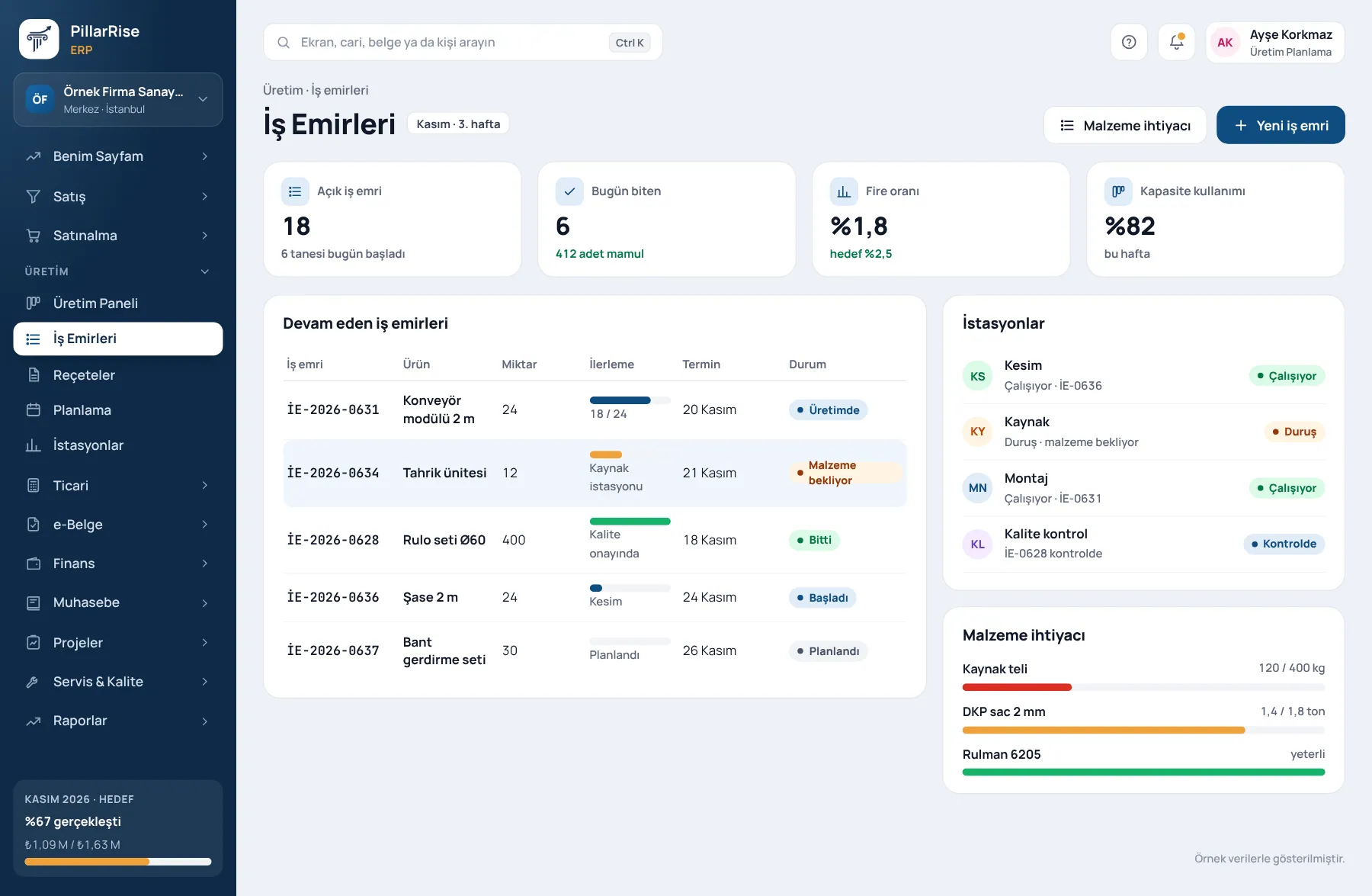
Work orders from sales orders, material requirements from work orders. Station status, downtime reasons and progress in real time; when the job is done, cost is calculated automatically.
Production
In the same system
Sales & CRMLeads, opportunities, quotes and orders in one line. Invoicing & e-DocumentsInvoices, delivery notes, e-Invoice and e-Archive. Accounts & FinanceCustomer accounts, cash, bank, cheques and notes. Stock & WarehouseItems, warehouses, counts, batches and serials.Shown with sample data. Business and personal names are not real. Application screens are in Turkish.
Flow
Sales orders and plans say what to make; MRP calculates what to buy and when; operators report from a tablet what is happening on the shop floor; actual materials and time set the cost.
Sales orders and plan demands uploaded from Excel.
Net requirement; make and buy suggestions.
The bill of materials and routing are copied to the work order.
The operator starts on a tablet and reports downtime and scrap.
At the last operation, consumption and finished goods post to stock.
Actual cost is finalised at close.
Material requirements planning (MRP)
It explodes sales orders and plan demands through the bill of materials, and nets off stock on hand and purchases on the way.
Even without production
In a company without the Production module, the same calculation runs as purchase suggestions on the Purchasing screen.
Shop floor
A line terminal on a tablet; operators work with a PIN, without logging in to the ERP.
Hardware
The terminal opens in a browser; a tablet or touch screen is enough.
Bills of materials and routings
Semi-finished goods explode automatically; batch output need not be 1. Subcontracted work becomes a component through a service card.
Gross = net ÷ (1 − scrap). With 5% scrap, 100 kg net needs 105.263 kg gross; counts do not come up short.
A change is a new version; when it is approved the old one is retired. Circular BOMs are rejected.
Machine and manual stations, operation times and hourly rates; the routing is versioned with the BOM.
Before producing, material requirements and estimated cost for a given quantity. A component with unknown cost is flagged, not counted as zero.
With the Quality module on, a nonconformity opens from the work order; root cause and actions are tracked.
Work orders and cost
Written with the BOM and routing version current at the time; a later change does not break an open work order. Opened from the sales order; duplicate planning is blocked.
Finished goods receipt without consumption is rejected; zero-cost goods never enter stock. Expired batches are not consumed; FIFO.
Actual materials + labour + production overhead divided by quantity produced; plan versus actual and the production cost report.
Why it matters
| Common manufacturer problem | In PillarRise ERP |
|---|---|
| Materials run short just as production starts. | MRP shows the net requirement and the latest order date in advance. |
| What happened on the shop floor is only known at the end of the day. | Operators report from a tablet; the line board is live. |
| Nobody knows why machines stop. | The downtime report gives duration by station and reason. |
| The real cost of a product is unknown, so prices are guesses. | Unit cost calculated from actual consumption, time and overhead. |
| When the BOM changes, the cost of past production changes too. | Approved BOMs are locked; a change is a new version. |
Set-up
Raw material, semi-finished and finished goods cards; stations and machines with hourly rates.
We start with a few main products and approve the BOMs together.
MRP, work orders and the terminal are tested end to end with a real order.
Go live; the first month's cost and downtime reports are read together.
PillarRise ERP
All on the same database with one login; add them as you need them.
Frequently asked questions
No; the station screen opens on a tablet or phone.
Approved BOMs and planning data on the item cards: lead time, minimum and maximum stock, minimum order quantity and order multiple. If these are empty MRP still runs; suggestions then follow requirements only.
No. Operators enter the terminal with a PIN and see only the work orders at their own station.
Today output, downtime and scrap are recorded through the operator's terminal entries. Let us discuss direct machine data in the demo.
Yes. Subcontracted work becomes a BOM component as a service card; batch-tracked goods get the work order number as batch, with expiry tracking.
In a 30-minute demo we listen to how you work and open the Production screens with an example close to your business. Set-up is done as process design, with support from our consultants.
Your cookie preference We would like to use Google Analytics cookies to improve the site and measure whether our advertising works. These cookies run only with your consent; if you decline, the site works just the same. Cookie Policy (TR)