
Enquiries from WhatsApp
If an incoming message matches a customer it is added to their history; if not, it opens as a new lead. Your number stays yours and the app on the phone keeps working.
PillarRise ERP · Sales & CRM
Every opportunity from lead to order on one board. While you write a quotation, stock, price and the customer's balance are on the same screen; an accepted quotation becomes an order in one click.
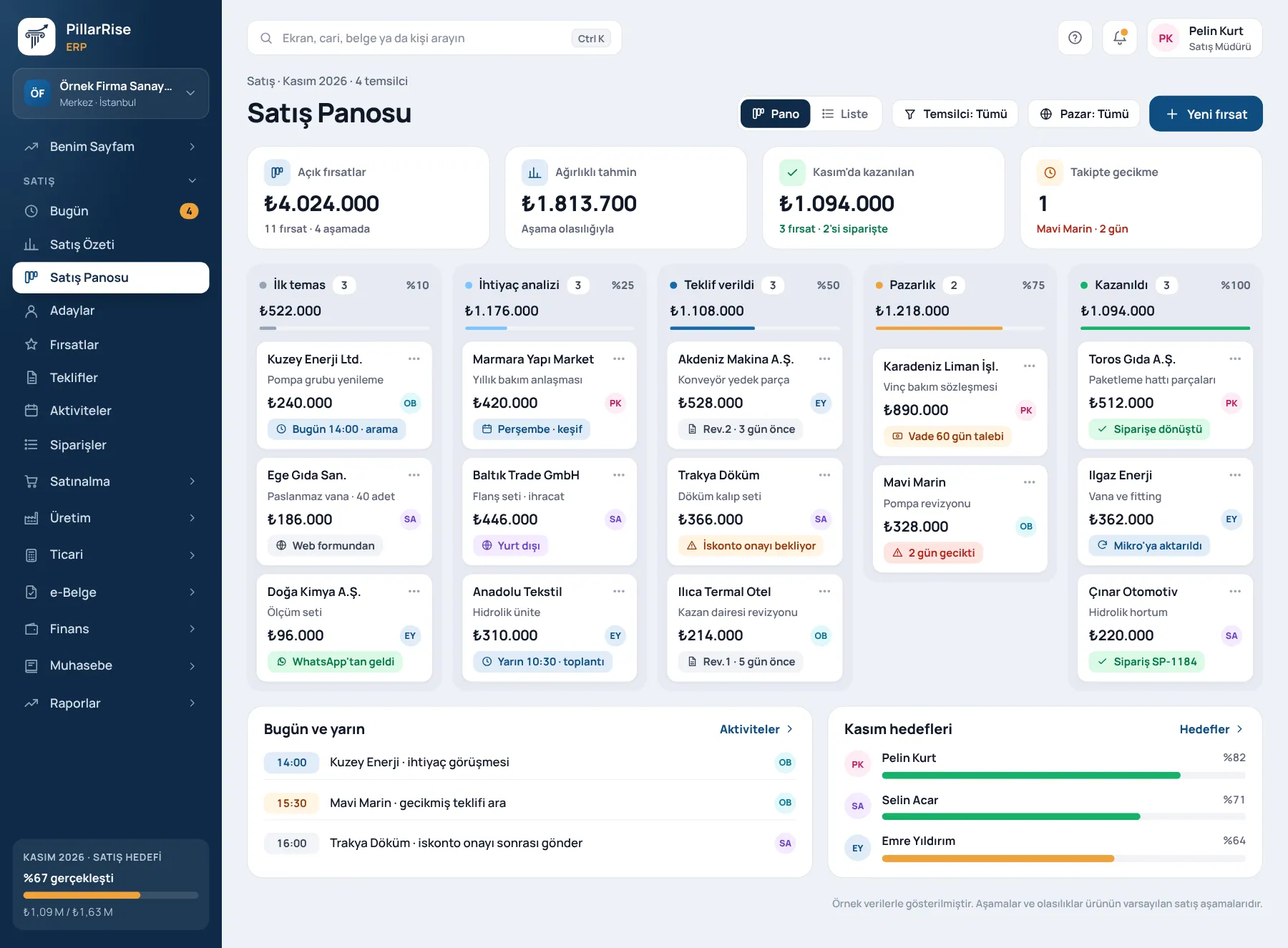
Sales & CRM
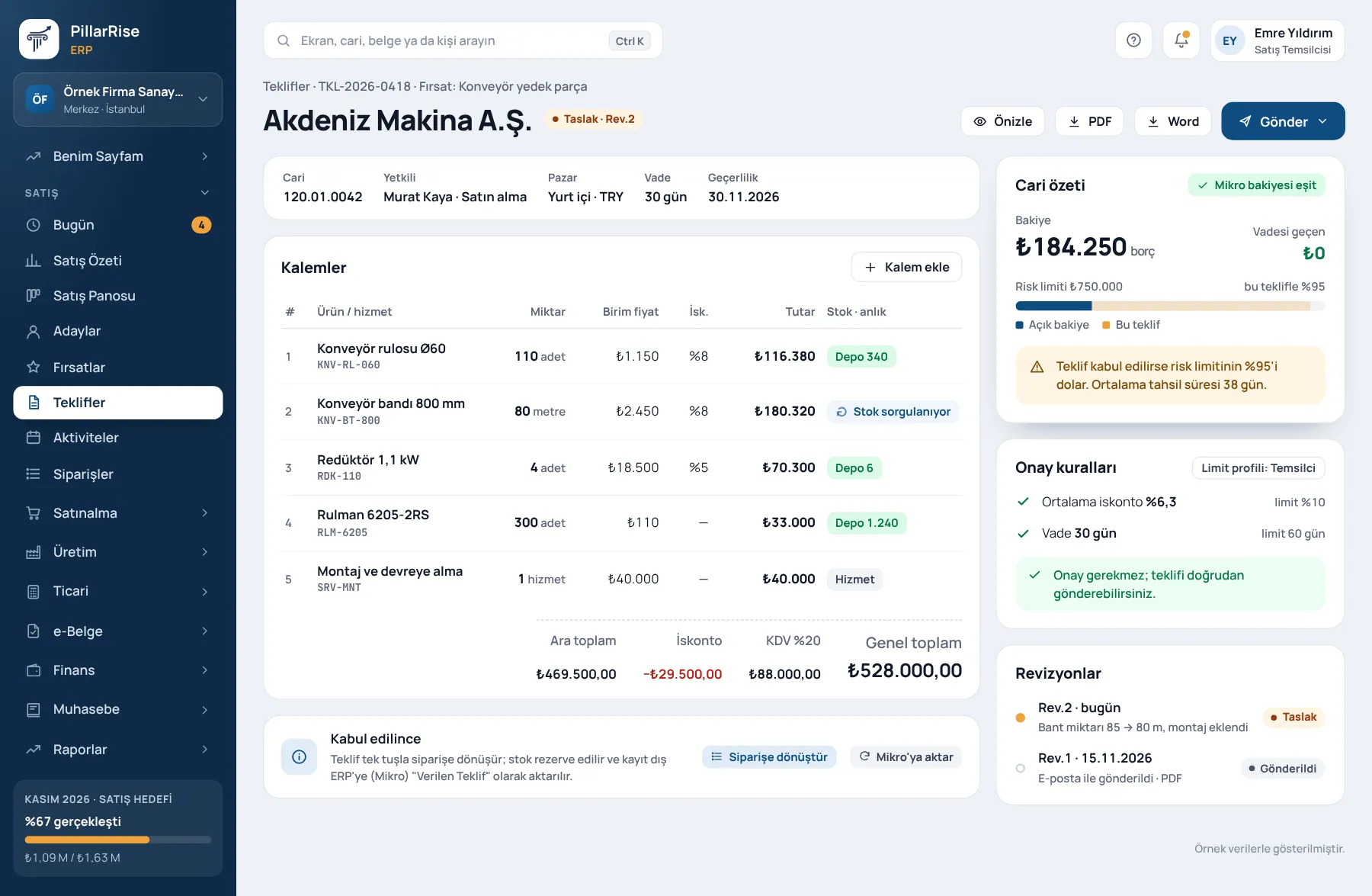
Shown with sample data. Business and personal names are not real. Application screens are in Turkish.
All of sales on one screen
Leads, opportunities, activities, quotations and outcomes — everything that happens with a customer sits on one timeline. The answer to "what did we last discuss with this customer?" is in the record, not in someone's memory.
If an incoming message matches a customer it is added to their history; if not, it opens as a new lead. Your number stays yours and the app on the phone keeps working.
Every e-mail to your sales address arrives in the CRM. Your own mail server, Google and Microsoft 365 connect.
Several WhatsApp lines, each linked to a salesperson. The enquiry opens for the right person and reminders go to them.
Opportunities move stage by stage with live column totals. A lost opportunity closes only with a reason.
Revisions are tracked; every quotation sent is added to the opportunity history. A won quotation becomes an invoice in one step.
Set a follow-up period on the product card: before it ends, a "call / visit" task opens for the invoiced customer.
Each salesperson receives the day's follow-up list in the morning, from the company's own sender address.
Weighted pipeline, win rate, loss reasons, source conversion and salesperson performance.
Cold, warm, hot; set a call frequency and the next call becomes a task automatically.
A sales team's day
The salesperson's day and the report management wants to see come from the same record.
Why it matters
Most CRMs keep records; this one makes you follow up. Sales moves out of people's memories and into the system's discipline.
Sound familiar?
| Today | With PillarRise CRM |
|---|---|
| Enquiries are scattered across salespeople's phones and WhatsApp. | Every enquiry is recorded with an owner; messages arrive in the CRM within seconds. |
| After a quotation is sent the follow-up call is forgotten and the deal goes to a competitor. | Open tasks are in the morning e-mail; a customer who received a quotation is not forgotten. |
| When a salesperson leaves, the customer history leaves too. | Call notes, meetings, messages, quotations and outcomes stay with the company on one timeline. |
How it works
The customer writes to your WhatsApp line or e-mails your sales address; it reaches the CRM within seconds.
A known sender goes to the customer's timeline; a new sender opens as a lead with a known source and the line's salesperson as owner.
The lead is qualified, the opportunity moves on the board, the quotation is prepared and revisions are tracked.
Open tasks are in the morning e-mail; when a product's follow-up period is due a call task opens; management follows the funnel report.
Channel connections, salesperson mapping and training are done together during set-up; the team starts using it on day one.
PillarRise ERP
All on the same database with one login; add them as you need them.
Frequently asked questions
Download it as PDF or Word, or share it with the customer through a personal link; the customer views the quotation from that link.
Visibility is a company setting: everyone, department only or own records only.
No. The line stays in your own Meta account; the WhatsApp Business app on the phone keeps working and incoming messages also reach the CRM.
In one step if the invoicing module is on. On customer acceptance each line is decided: invoice now, add to order or declined.
In a 30-minute demo we listen to how you work and open the Sales & CRM screens with an example close to your business. Set-up is done as process design, with support from our consultants.
Your cookie preference We would like to use Google Analytics cookies to improve the site and measure whether our advertising works. These cookies run only with your consent; if you decline, the site works just the same. Cookie Policy (TR)