
Payroll journal bridge
The finalised payroll period arrives as a draft journal using the account mapping, split by cost centre. Personal pay data never moves into accounting.
PillarRise ERP · General Ledger
Invoice, cash, bank and payroll transactions become journal entries automatically. Trial balance, ledger and VAT summary are ready; the period closes with checks.
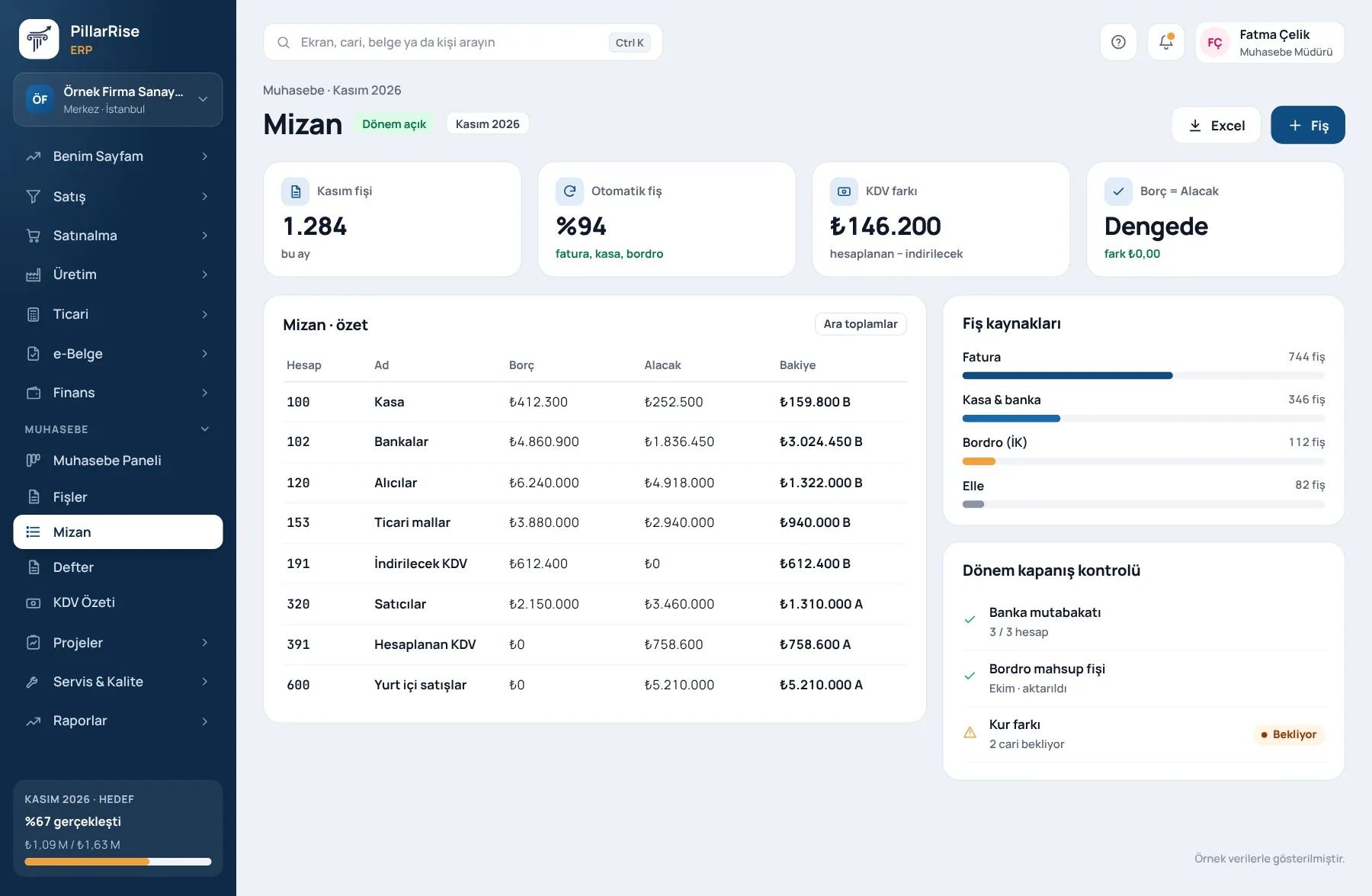
General Ledger
In the same system
Sales & CRMLeads, opportunities, quotes and orders in one line. Invoicing & e-DocumentsInvoices, delivery notes, e-Invoice and e-Archive. Accounts & FinanceCustomer accounts, cash, bank, cheques and notes. Stock & WarehouseItems, warehouses, counts, batches and serials.Shown with sample data. Business and personal names are not real. Application screens are in Turkish.
The statutory books, digital
When accounting is a separate program, data is entered twice and the two sets never agree. Under one roof, the trial balance is always current.
The finalised payroll period arrives as a draft journal using the account mapping, split by cost centre. Personal pay data never moves into accounting.
All entries in one order; trace from document to entry and from entry to document.
Monthly and cumulative; management sees the picture without waiting for period end.
Output and input VAT summary ready for the return period.
Allocation and closing entries for an orderly period end.
Entries are transferred in the format your accountant uses; reconciliation reports are ready.
Entries arrive on their own
One body with day-to-day accounting
A document is entered once and the journal entry is created automatically. Manual journals are for exceptions only.
Sound familiar?
| Today | With PillarRise |
|---|---|
| The same document is entered into two programs. | No double entry; the document creates its own journal. |
| The trial balance is only visible after month end. | The trial balance is always current. |
| The payroll journal is written by hand every month. | One click for the payroll journal; only totals move. |
Getting started
The chart of accounts is adapted and the opening entry is made.
Document type to account mappings and the payroll account mapping.
Documents create their own entries; manual journals only for exceptions.
VAT summary, close and transfer to your accountant.
PillarRise ERP
All on the same database with one login; add them as you need them.
Frequently asked questions
No; the transfer file is ready.
Yes. Entries are transferred in the format your accountant uses; if your statutory books are in Mikro, its trial balance and chart of accounts are shown read-only.
No. Only account-level totals move to accounting; personal pay data stays in HR.
In a 30-minute demo we listen to how you work and open the General Ledger screens with an example close to your business. Set-up is done as process design, with support from our consultants.
Your cookie preference We would like to use Google Analytics cookies to improve the site and measure whether our advertising works. These cookies run only with your consent; if you decline, the site works just the same. Cookie Policy (TR)