
Project profitability
Income (invoices and progress claims) against cost (hours, expenses, purchases) per project; margin tracked live.
PillarRise ERP · Projects & Progress Billing
Budget, time spent and materials are collected per project. Progress claims are prepared with deductions and turned into invoices; project profitability is tracked live.
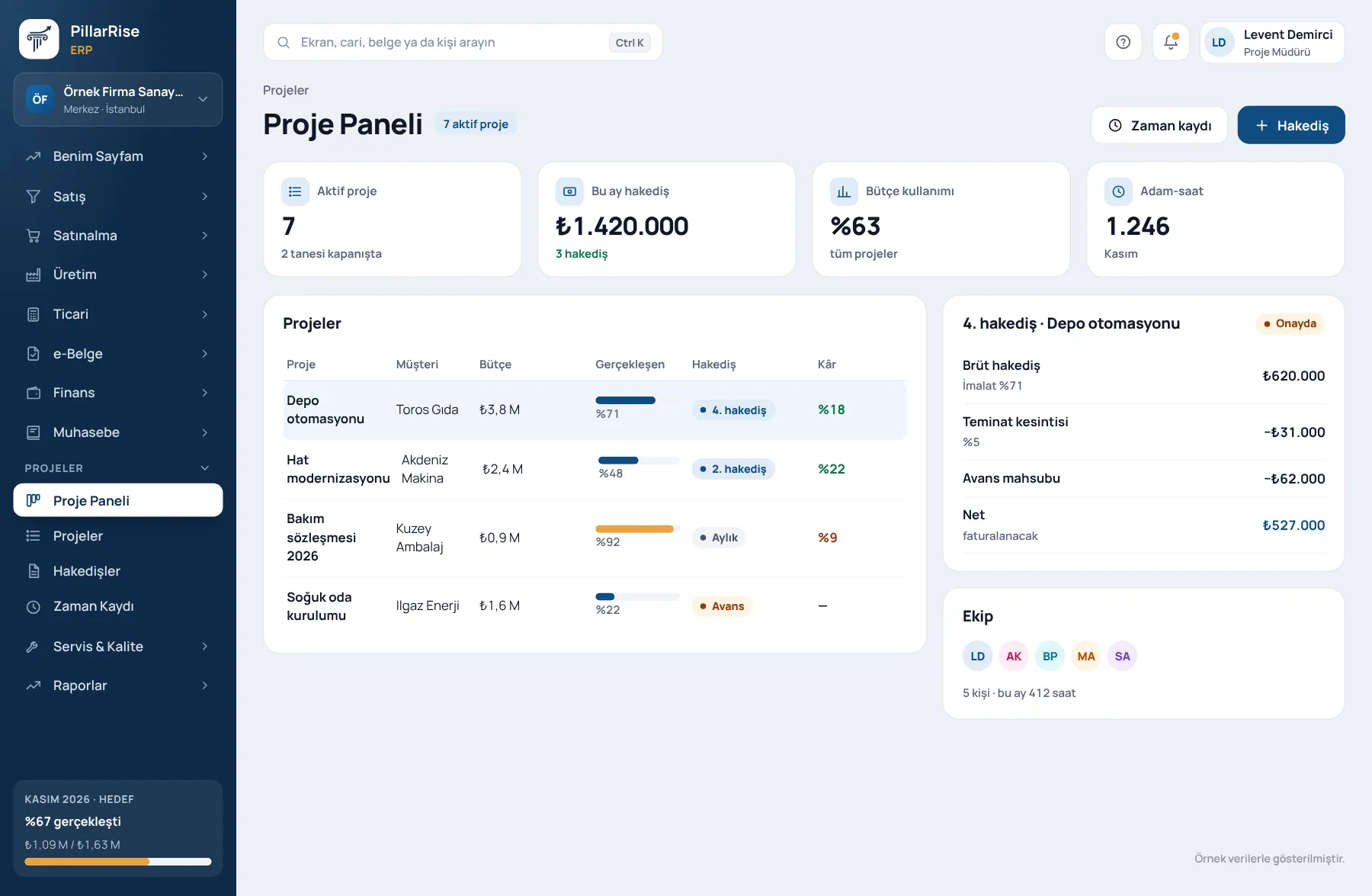
Projects & Progress Billing
In the same system
Sales & CRMLeads, opportunities, quotes and orders in one line. Invoicing & e-DocumentsInvoices, delivery notes, e-Invoice and e-Archive. Accounts & FinanceCustomer accounts, cash, bank, cheques and notes. Stock & WarehouseItems, warehouses, counts, batches and serials.Shown with sample data. Business and personal names are not real. Application screens are in Turkish.
Every figure of the project, in one place
Project profitability should be seen every day, not calculated at period end. Hours + expenses + purchase invoices = real cost.
Income (invoices and progress claims) against cost (hours, expenses, purchases) per project; margin tracked live.
The team records time against projects; whose time went to which job is reported.
Project budget, contract value, guarantees and withholding on record.
Periodic progress claims; previous claims, deductions and remaining work visible.
Sales and purchase invoices are linked to projects; past invoices can be linked later.
A won opportunity becomes a project; one chain from sale to delivery.
Built for service work
Consulting, engineering, software and contracting work run in the same module, each with its own billing.
Periodic billing on time worked and expenses.
Billing tied to delivered stages; the invoice is prepared when a stage is complete.
Period claims with cumulative quantities, previous claims and deductions.
Sound familiar?
| Today | With PillarRise |
|---|---|
| The project ends and nobody knows whether it made money. | Profit or loss is visible while the project runs, not at the end. |
| Hours are never recorded, so the biggest cost is invisible. | Hours are a cost too; invisible time becomes visible. |
| The progress claim is rebuilt in Excel every period. | Claims in minutes; guarantees and withholding are not forgotten. |
Getting started
Projects and contracts are entered and the billing model chosen.
Past invoices are linked to projects and the team starts recording hours.
Progress and milestone invoices are issued and expenses post to projects.
The profitability report is read; new quotations are priced on real data.
PillarRise ERP
All on the same database with one login; add them as you need them.
Frequently asked questions
Yes; contracts billed monthly are tracked as projects.
Yes. Sales and purchase invoices already issued can be linked to a project later; the profitability report builds retrospectively.
In a 30-minute demo we listen to how you work and open the Projects & Progress Billing screens with an example close to your business. Set-up is done as process design, with support from our consultants.
Your cookie preference We would like to use Google Analytics cookies to improve the site and measure whether our advertising works. These cookies run only with your consent; if you decline, the site works just the same. Cookie Policy (TR)