
Warehouse movements
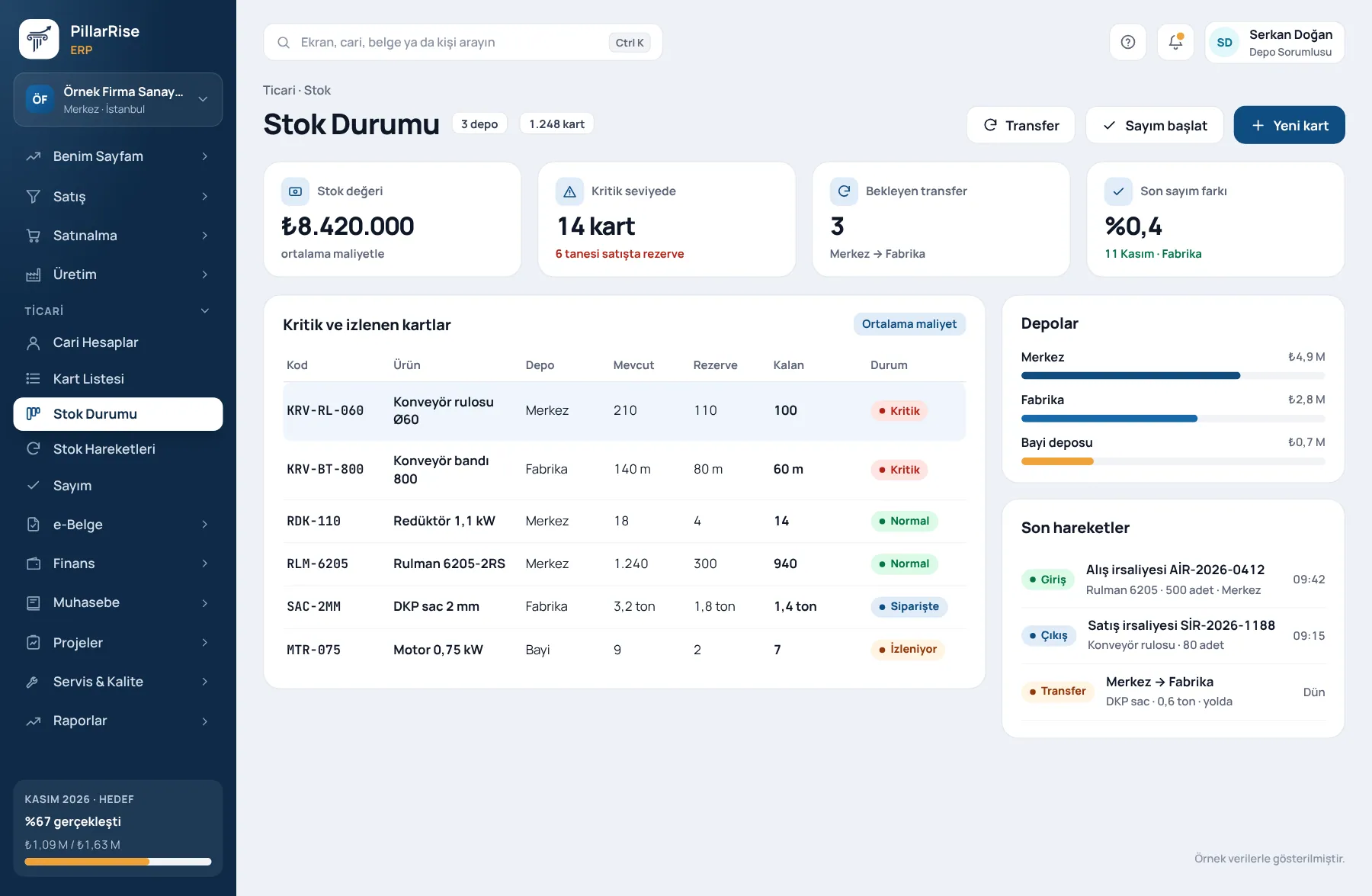
Receipts, issues, transfers and counts; differences corrected with a record.
PillarRise ERP · Stock & Warehouse
Every sale, purchase and production run updates stock instantly. Reserved, available and minimum levels are shown separately; count differences are recorded with their reason.
Stock & Warehouse
In the same system
Sales & CRMLeads, opportunities, quotes and orders in one line. Invoicing & e-DocumentsInvoices, delivery notes, e-Invoice and e-Archive. Accounts & FinanceCustomer accounts, cash, bank, cheques and notes. PurchasingRequests, approval, orders and goods receipt.Shown with sample data. Business and personal names are not real. Application screens are in Turkish.
A closed loop from stock to purchasing
Stock is not just a number; it is the sum of orders, reservations and goods in transit. A business that sees all three neither under-buys nor over-buys.
Receipts, issues, transfers and counts; differences corrected with a record.
Which batch went to whom, which serial is in which warehouse — traceable back.
Sales orders reserve stock; partial dispatch and delivery dates keep the promised date.
Minimum stock alerts; valuation and slow-moving stock reports show the cash tied up.
Variants such as colour and size, barcode operations, unit conversion and price lists.
Requests pass approval levels by amount, become orders and close with goods receipt.
Purchase suggestions
Material requirements planning runs even in companies that do not manufacture: stock, open orders and expected purchases are netted to produce suggestions.
Ready for production
When the Production module is switched on, BOMs use the same stock items; no new cards are opened.
Sound familiar?
| Today | With PillarRise |
|---|---|
| Stock on the system is one number, on the shelf another. | Shelf and record agree; count differences are corrected with a record. |
| Purchasing runs on WhatsApp messages, without approval. | Who asked, who approved, at what price — all on record. |
| Goods promised to a customer turn out to have been sold to someone else. | Goods tied to an order are reserved and do not go elsewhere. |
Getting started
Stock items and barcodes are transferred and warehouses defined.
Opening inventory is entered and minimum levels set.
Orders, dispatch, goods receipt and approved purchasing go live.
Periodic counts, valuation and slow-moving stock reports.
PillarRise ERP
All on the same database with one login; add them as you need them.
Frequently asked questions
Yes; barcodes are scanned on item, sales and count screens.
By average cost; it is recalculated when a back-dated entry is made.
Yes. Stock, open sales orders and expected purchases are netted to give purchase suggestions; the latest order date is calculated from lead time.
In a 30-minute demo we listen to how you work and open the Stock & Warehouse screens with an example close to your business. Set-up is done as process design, with support from our consultants.
Your cookie preference We would like to use Google Analytics cookies to improve the site and measure whether our advertising works. These cookies run only with your consent; if you decline, the site works just the same. Cookie Policy (TR)