
Purchase request
Who, what, how much and why: request lines, estimated amount and justification. Requests can be withdrawn; status is always visible.
PillarRise ERP · Purchasing
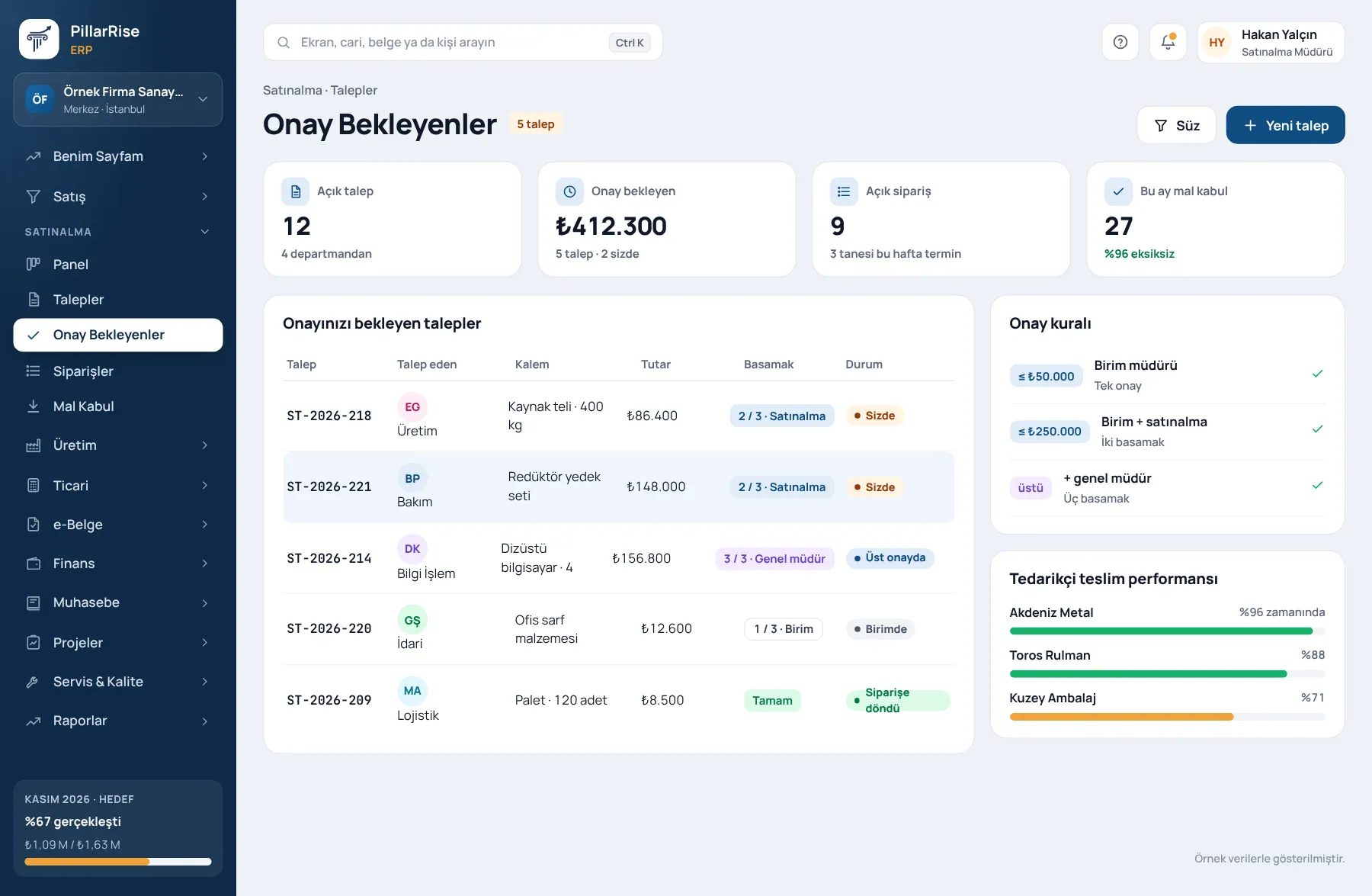
The person who requests, the person who approves and the person who orders are different. Approval levels apply by amount; incoming goods are received against the order.
Purchasing
In the same system
Sales & CRMLeads, opportunities, quotes and orders in one line. Invoicing & e-DocumentsInvoices, delivery notes, e-Invoice and e-Archive. Accounts & FinanceCustomer accounts, cash, bank, cheques and notes. Stock & WarehouseItems, warehouses, counts, batches and serials.Shown with sample data. Business and personal names are not real. Application screens are in Turkish.
Request and approval
The requester cannot approve their own request; a higher level cannot decide before the lower one.
Who, what, how much and why: request lines, estimated amount and justification. Requests can be withdrawn; status is always visible.
Below the limit, one approval; above it, a second. The order is enforced; the requester cannot approve.
Approvers see only requests whose turn has come; every decision is recorded with date and person.
Orders and goods receipt
The order opens from the approved request and stays linked to it; orders awaiting delivery have their own list.
Part of the quantity can be accepted and the rest stays pending; rejected lines are recorded with a reason. Receipts can be reversed.
Acceptance and rejection rate by supplier; with the Quality module on, a nonconformity opens from the receipt line.
Planning
Production not required
Suggestions are calculated even without the Production module.
Why it matters
| Common problem | In PillarRise Purchasing |
|---|---|
| Nobody knows who approved; approvals get lost in e-mails. | The chain builds by amount; every decision recorded with person and time. |
| The requester approves their own request. | The requester cannot approve; a higher level cannot skip the order. |
| Short deliveries enter stock as if complete. | Partial receipt and rejection; the remaining quantity shows as pending. |
| Materials run out and orders are placed late. | Purchase suggestions from net requirements and the latest order date. |
PillarRise ERP
All on the same database with one login; add them as you need them.
Frequently asked questions
Yes; a request raised in PillarRise HR enters the same approval flow.
Yes. Amount limits and which user holds which level are set in company settings.
Part of the quantity is accepted and faulty lines are rejected with a reason. With the Quality module on, a nonconformity opens from the same line.
In a 30-minute demo we listen to how you work and open the Purchasing screens with an example close to your business. Set-up is done as process design, with support from our consultants.
Your cookie preference We would like to use Google Analytics cookies to improve the site and measure whether our advertising works. These cookies run only with your consent; if you decline, the site works just the same. Cookie Policy (TR)